Fix SSL Issue
For the best experience and to ensure all features work correctly, your website should be configured to use HTTPS rather than HTTP.
Please make sure that an SSL certificate is installed and enabled on your hosting account. If you’re unsure about it, please contact your hosting provider. Most hosts offer free SSL certificates and can help you activate HTTPS on your website. Your WordPress URLs should use https://.
To verify your website settings:
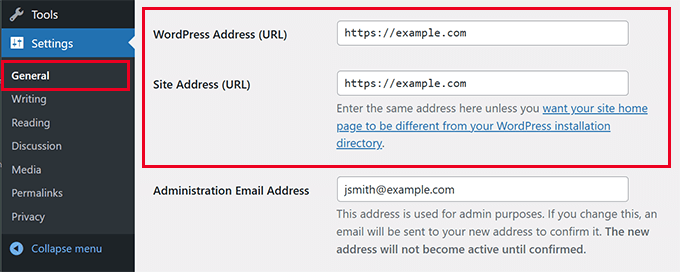
- Navigate to WordPress Dashboard → Settings → General.
- Locate the WordPress Address (URL) and Site Address (URL) fields.
- Change both URLs from
http://tohttps://(If it is not). - Click Save Changes to apply the new settings.
If your website is still using http://, you may encounter various issues, including:
- Images not displaying correctly
- Mixed content warnings in the browser
- Missing styles or scripts
- Demo import problems
- Security warnings for visitors
Note: If you are running WordPress locally using XAMPP, LocalWP, MAMP, or a similar local development environment, SSL is generally not required and you can safely continue using HTTP during development.
FAQ. I have replaced my logo, but it is not displaying? Why?
The problem is related to your SSL settings. Fix it as mentioned above and upload your image again.