• Getting Started
    • Theme Requirements
    • Theme Installation
    • Plugins Installation
    • Elementor Pro
    • Fix SSL Issue
    • Regenerate Thumbnails
    • Demo Installation
  • Elementor Guide
  • Video Tutorials
  • Theme Usage
    • Theme Settings
    • Rivax Templates
    • Site Custom Width
    • Manage Header & Footer
    • Setup Menu
    • Setup Mobile Menu
    • Setup OffCanvas Menu
    • Setup Mega Menu
    • Setup Home Page
    • Hide Page Title
    • Setup Archive Template
    • Setup Related Posts
    • Sidebar Layout
    • Sticky Sidebar
    • Publish Posts
    • Post Layout
    • Post Formats
    • Typography
    • Global Colors
    • Category Color
    • User Avatar
    • Setup AMP
    • Translating the Theme
    • Child Theme
  • Performance Optimization
  • Setup WooCommerce
  • Updating the Theme
  • Contact Support
Syron
Powerful Blog & Magazine Wordpress theme
Purchase Support

User Avatar

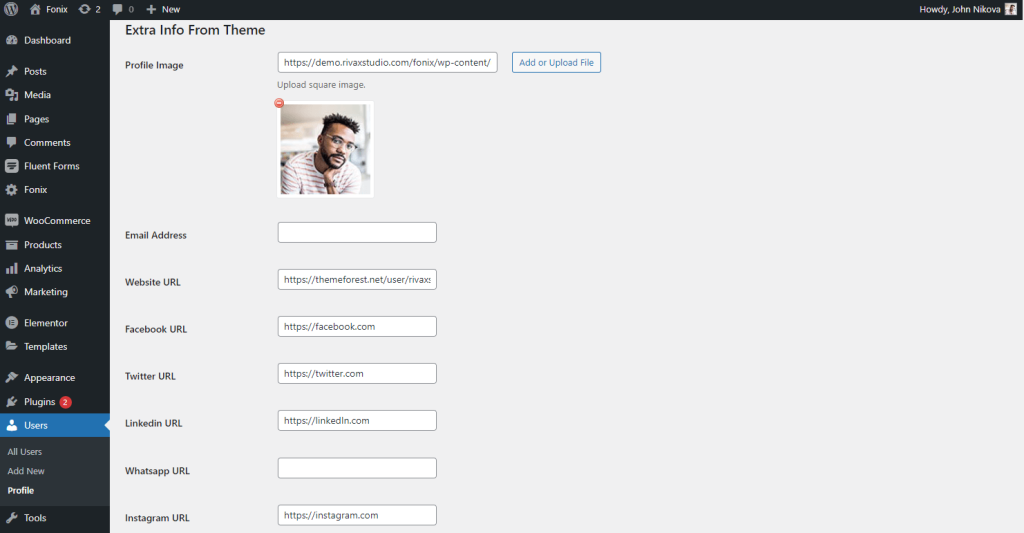
The theme allows you to upload a custom author avatar and add social media profile links that can be displayed in the author bio section.

To change your avatar image, simply go to Users > Profile > Extra Options tab, and choose your avatar image. Also, here you can fill in your social media address to show in your bio section in single posts.